
User story mapping is a crucial technique in Agile software development that helps teams visualize the user’s journey, identify pain points, and prioritize features that will add value. Story maps allow product teams to organize user stories, ensure the user experience is top-notch, and create a cohesive roadmap for development.
In this article, we will explore practical story map examples, show you how to create your own user story map using ProductGo, and dive into how this method can improve your Agile processes.
What is Story Mapping?
Story mapping is a technique that helps teams break down the user journey into steps, activities, and tasks that lead to the user’s ultimate goal. It’s a visual representation of the user’s experience that helps teams organize and prioritize their work in a way that aligns with the user’s needs.
A typical user story map consists of three main components:
- User Goals: The primary objectives the user wants to achieve.
- User Activities: The tasks the user performs to achieve their goals.
- User Tasks: Specific actions taken by the user during each activity.
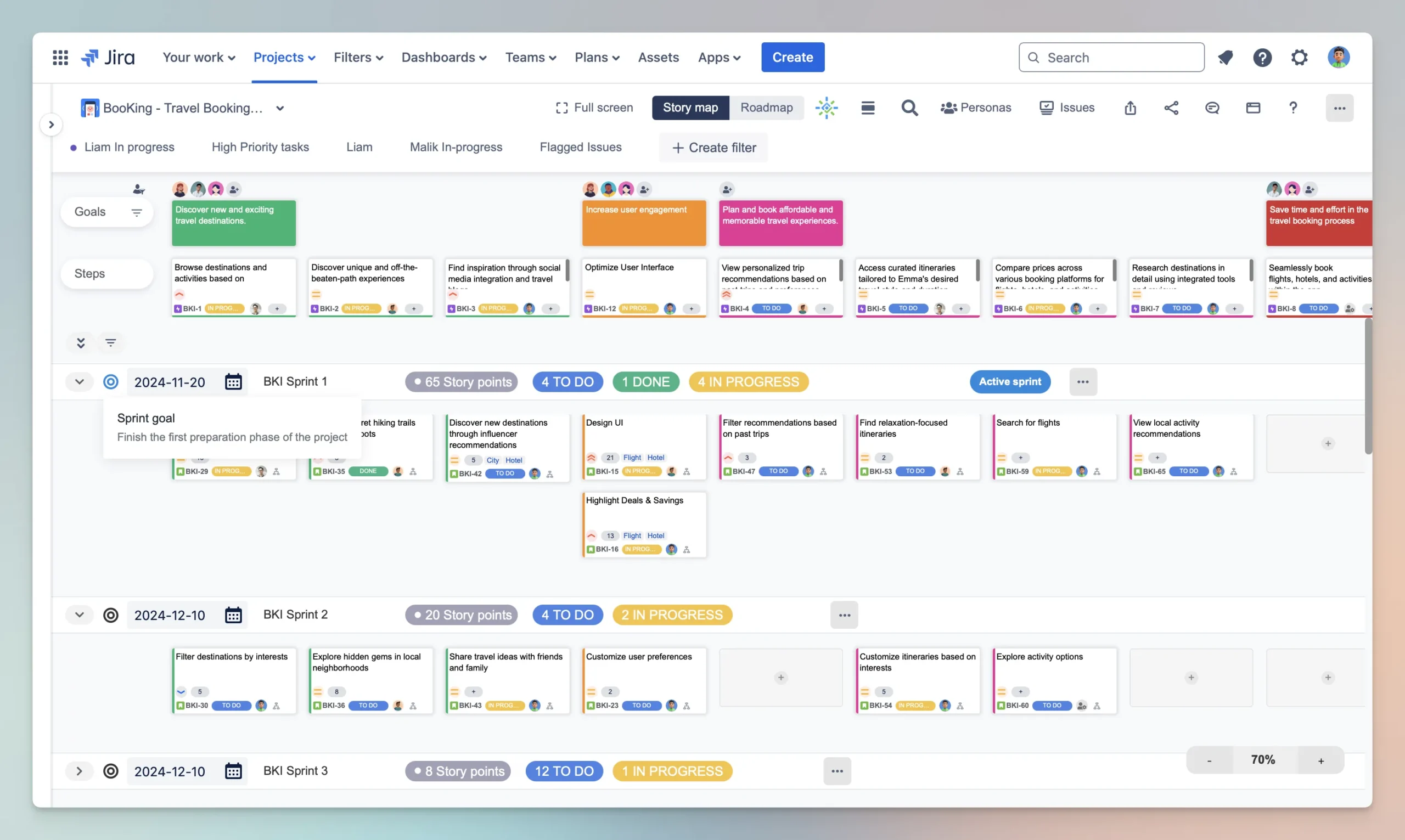
The process of story mapping allows teams to prioritize tasks based on user needs and build a product that truly serves its audience. It helps clarify both the user experience and the team’s workflow, creating a shared understanding across stakeholders.
Why Use Story Mapping?
Holistic View of User Journey
Story mapping provides a holistic view of the user experience by showing the entire journey from start to finish. It enables teams to visualize all the steps the user takes, which helps ensure no essential task is left behind. This comprehensive view helps with identifying and addressing gaps in the user journey.
Better Prioritization
Story maps help teams prioritize work based on user value. When tasks are organized by user goal, it’s easier to see which activities and features are most important for delivering value to the user. Teams can focus on high-priority stories that contribute the most to achieving the user’s goal.
Collaborative Team Alignment
By using a story map, all team members, from developers to product owners and designers, can collaboratively align around a shared vision of the product. Story maps ensure that everyone is on the same page about the user’s needs and the product’s functionality. It encourages collaboration, discussion, and alignment across all stakeholders.
Improved Efficiency
Story mapping ensures that the team works efficiently by eliminating redundant or unnecessary tasks. With a clear roadmap, teams avoid wasting time on low-priority features and can instead focus on the core functionality that delivers the most value to users.
How to Create a Story Map
Creating a story map example with ProductGo involves several straightforward steps. The following guide outlines how to build a user story map for your product:
Step 1. Identify User Goals
The first step in creating a story map is to identify the high-level user goals. These are the broad objectives that the user wants to achieve when using the product. User goals should be focused on outcomes, not specific features. They provide a foundation for organizing and prioritizing the work ahead.
Example Goal: As a user, I want to order food online so that I can have it delivered to my home.
Step 2. Break Down User Activities
Once you’ve established the user goals, the next step is to break each goal down into smaller user activities. These are the steps users take to achieve their goal. Activities are the key actions users perform in their journey. In our example, ordering food involves several key activities.
Example Activities:
- Browse available restaurants or cuisines
- Select items to add to the cart
- Review the order and check out
- Track the order until delivery
Step 3. Add Specific User Tasks
Next, for each activity, identify the specific tasks or actions that the user must take. These tasks define how the user performs each activity, and they will ultimately be translated into development work. Tasks are often more granular and concrete than activities.
Example Tasks for Activity “Browse Available Restaurants”:
- Filter restaurants by ratings, type of cuisine, or delivery time
- Search for specific dishes or types of food
- View restaurant details (menu, ratings, estimated delivery time)
Step 4. Prioritize Tasks
After breaking down the user activities into tasks, the next step is to prioritize them. Consider which tasks are most critical to the user experience and which tasks provide the most value. Prioritize tasks by importance and complexity, and organize them into a roadmap.
Story Map Example 1: Online Food Delivery
Let’s look at a story map example in the context of an online food delivery application.
User Goal: Order food online and have it delivered.
User Activities and Tasks:
- Browse and Select a Restaurant
- Filter restaurants by cuisine type, ratings, or delivery time
- Search for restaurants based on the user’s preferences (vegan, fast food, etc.)
- View restaurant menus, reviews, and delivery estimates
- Select Food Items
- Browse through the menu to find dishes
- Customize items (e.g., extra toppings, spice levels)
- Add items to the cart
- Review and Checkout
- Review the cart for item quantities and prices
- Apply any promo codes or discounts
- Choose payment options (credit card, PayPal, etc.)
- Enter delivery address and confirm order
- Track and Receive the Order
- Track the order status in real-time (e.g., preparing, out for delivery)
- Communicate with the delivery driver if necessary
- Receive the order and provide feedback or rating
Story Map Example 2: E-commerce Website
User Goal: Browse products and make an online purchase.
User Activities and Tasks:
- Browse Products
- Search for products by name or category
- Filter products by price, brand, and features
- Sort products by ratings, price, or popularity
- View product details and images
- Select and Add to Cart
- Select product variants (size, color, etc.)
- Check product availability and delivery options
- Add product to the cart or wish list
- Proceed to Checkout
- Review cart items and prices
- Add shipping and billing information
- Apply promo codes or loyalty points
- Select payment method and place the order
- Track Order and Delivery
- Track the order status
- Contact customer support for assistance
Receive the order and provide feedback
Story Map Example 3: Social Media Platform
User Goal: Connect and engage with friends and family
User Activities and Tasks:
- Set Up Profile
- Sign up or log in
- Add profile photo and bio
- Customize privacy settings
- Find Friends
- Search for people by name or interests
- Send or accept friend requests
- Follow people or pages of interest
- Create and Share Posts
- Create a new post with text, images, or videos
- Tag friends or locations
- Share post on the feed
- Interact with Content
- Like, comment, and share posts
- Join groups and participate in discussions
- Send private messages or start a video call
→ Related content: User Story Map Examples
Advanced Techniques for Story Mapping
While creating story map examples is helpful, there are a few advanced techniques you can use to further refine the process and enhance the effectiveness of your user story map:
Prioritize User Stories
Effective prioritization is key to ensuring that you’re working on the most important features first. Consider using the following prioritization methods:
- MoSCoW Method: Categorize user stories as Must Have, Should Have, Could Have, and Won’t Have for the current release.
- Value vs. Complexity: Plot user stories based on their value to the user and development complexity to focus on high-value, low-complexity features first.
- Weighted Shortest Job First (WSJF): Prioritize based on the cost of delay and size, ensuring the most valuable stories are completed first.
Identifying the MVP (Minimum Viable Product)
When using story mapping to define your MVP, focus on the user flows that are essential for the product’s core functionality. This includes:
- Selecting the most critical tasks and activities that users need to accomplish their goal.
- Leaving out features or tasks that are “nice-to-haves” and do not directly contribute to the user’s core experience.
→ Read more: Minimum Viable Product (MVP)
Tools for Story Mapping
Creating and collaborating on a story map is easier with the right tools. ProductGo offers an intuitive story mapping tool that integrates seamlessly with Jira to help teams organize and visualize user stories.
ProductGo Features:
- Collaboration: Team members can contribute to the story map in real-time, making it easier to gather feedback and make decisions.
- Integration with Jira: Changes made in the story map are automatically reflected in Jira, keeping the backlog and sprint planning up-to-date.
- Drag-and-Drop Interface: Organize tasks and user stories quickly and easily with a drag-and-drop interface.
- Visual Representation: The story map visualizes user flows and dependencies, making it easy to identify areas for improvement.
For more details, check out the ProductGo User Story Map.
Conclusion
Story mapping is an invaluable technique for organizing, prioritizing, and planning product development based on the user’s journey. By creating a story map example with clear goals, activities, and tasks, teams can ensure they’re focused on delivering real value to users. Using tools like ProductGo can further streamline this process, allowing for better collaboration and alignment within the team.
With story mapping, you’ll not only enhance your team’s understanding of the user experience but also improve efficiency and deliver a product that meets user needs and expectations.