
Short answer: not really. As of late 2026, Jira doesn’t include a built-in user story map. You can get part of the way with epics, a board grouped by epic, or a Confluence whiteboard that turns sticky notes into Jira issues. For a full map that stays in sync with your backlog, many teams add a Marketplace app.
Atlassian ships updates often, so if you’re reading this a few months from now, it’s worth checking Jira’s release notes in case something has changed.
You’re a product owner with 180 items in the backlog and a dozen epics. Your manager asks a simple question: “What’s in the first release?”
You scroll. And scroll. The backlog is ranked, but it’s one long list, so you can’t see how the stories connect to what a user actually does.
Below, we’ll cover what Jira does on its own, what Atlassian adds, and when an app is worth it, plus a quick test to judge any option.
What a story map actually needs to do
A user story map lays out your product the way a user moves through it. The big steps run left to right, and the stories for each step stack underneath. If you want the full background, our guide to what user story mapping is covers it.
For this article, all you need is a quick test. Any tool that calls itself a story map should let you answer three questions at a glance.
- Can you see the user’s journey from left to right?
- Can you see which stories belong to each step of that journey?
- Can you draw a line across the map to show what ships in each release?
What Jira gives you out of the box
Jira is great at tracking work. It just wasn’t built to show that work as a journey. Here’s how its built-in views do on our three questions.
The backlog and epics
The backlog is a ranked list, and epics group related stories. That covers question 2, more or less. But a single list can’t show a journey from left to right, and there’s no easy way to draw a release line across it.
A board grouped by epic
This is the closest you’ll get without an add-on. Group your board by epic and each epic becomes a row of its own. It’s handy for seeing progress, but the rows stack top to bottom, so the journey still isn’t laid out in order.
Timeline and Plans
Timeline shows epics on a calendar, and Plans (part of Jira Premium) adds planning across teams. Both answer “when?” really well. Neither answers “what does the user do first, and what’s the smallest thing we can ship?” That’s the job a story map does.
Try it: a rough story map in plain Jira (about 15 minutes)
If you just want to see whether story mapping helps your team, you can fake it in Jira today.
- Rename or create epics so each one matches a step in the user’s journey, like “Sign up”, “Search”, “Check out”.
- Add a number to each epic name (01, 02, 03) so they sort in journey order.
- Group your board by epic so each step gets its own row.
- Use fix versions (releases) as your release lines, and tag each story with the release it belongs to.
Menu names differ a bit between team-managed and company-managed projects, so you may want to check Atlassian’s support docs if an option isn’t where you expect.
It works for a small product. Once you’re past a handful of epics, though, the cracks show. You can’t drag a story from one release to another on a single screen, and nobody outside the team will read the map without a walkthrough.
Atlassian’s other options: whiteboards and Jira Product Discovery
Atlassian’s own story mapping guide points teams to two other tools, Confluence whiteboards and Jira Product Discovery. Neither is a story map inside Jira, but both can help.
Confluence whiteboards
Whiteboards feel a lot like a physical story mapping session. You stick notes on a board, move them around with your team, and then turn the notes into Jira issues. Atlassian says changes sync both ways between the whiteboard and Jira. That post is a couple of years old, so it’s worth checking what your Confluence plan includes today.
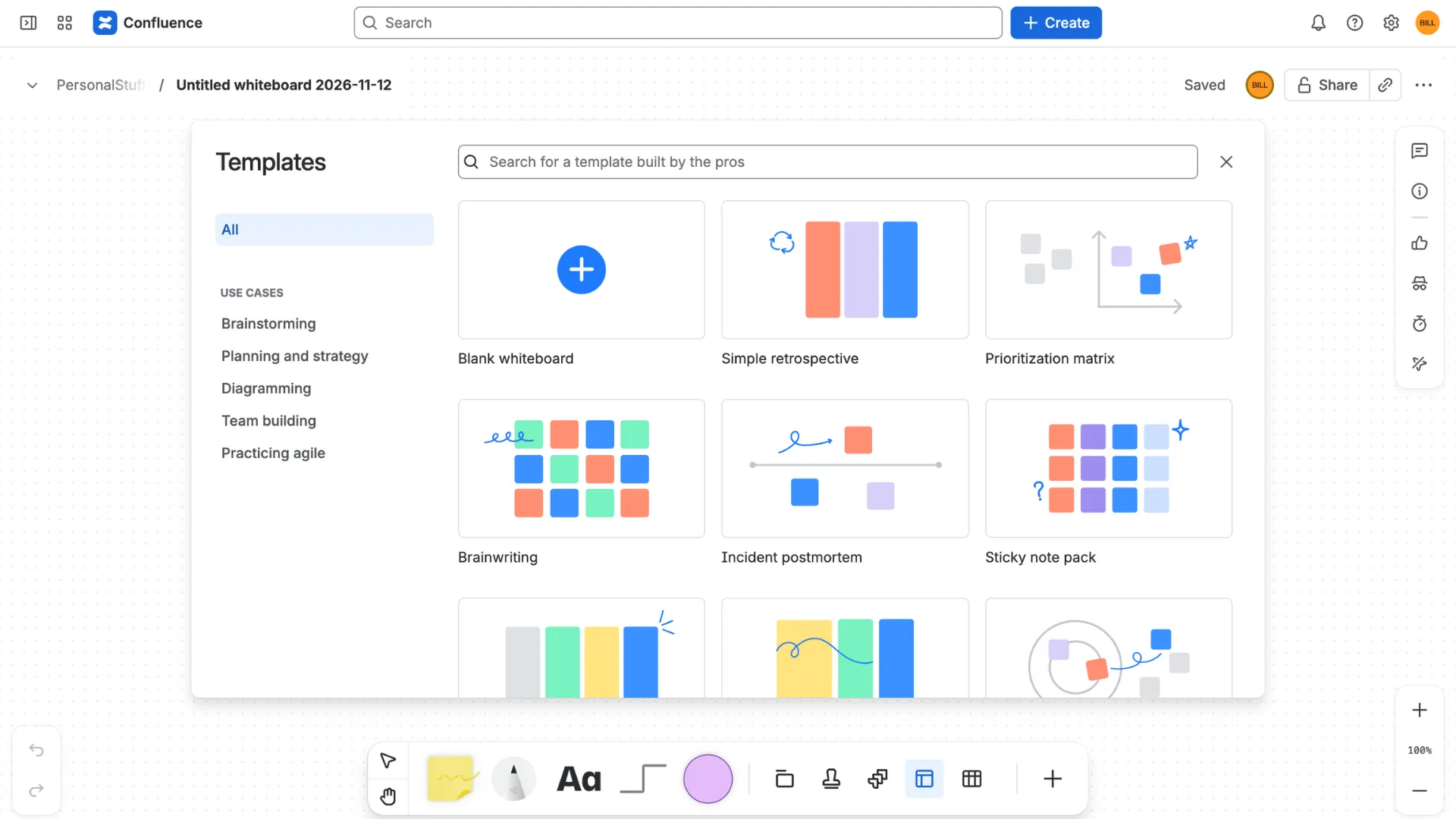
For a one-off workshop, this is a solid choice. The tricky part, in our experience, comes a few sprints later. A whiteboard is a picture you have to keep tidy by hand, so it tends to drift away from what’s really in the backlog.
Jira Product Discovery
Jira Product Discovery is built for collecting ideas, scoring them and sharing a roadmap of what you’ll build next. It doesn’t lay stories out along a user journey, so we’d treat it as a partner to a story map rather than a replacement.
What story map apps add
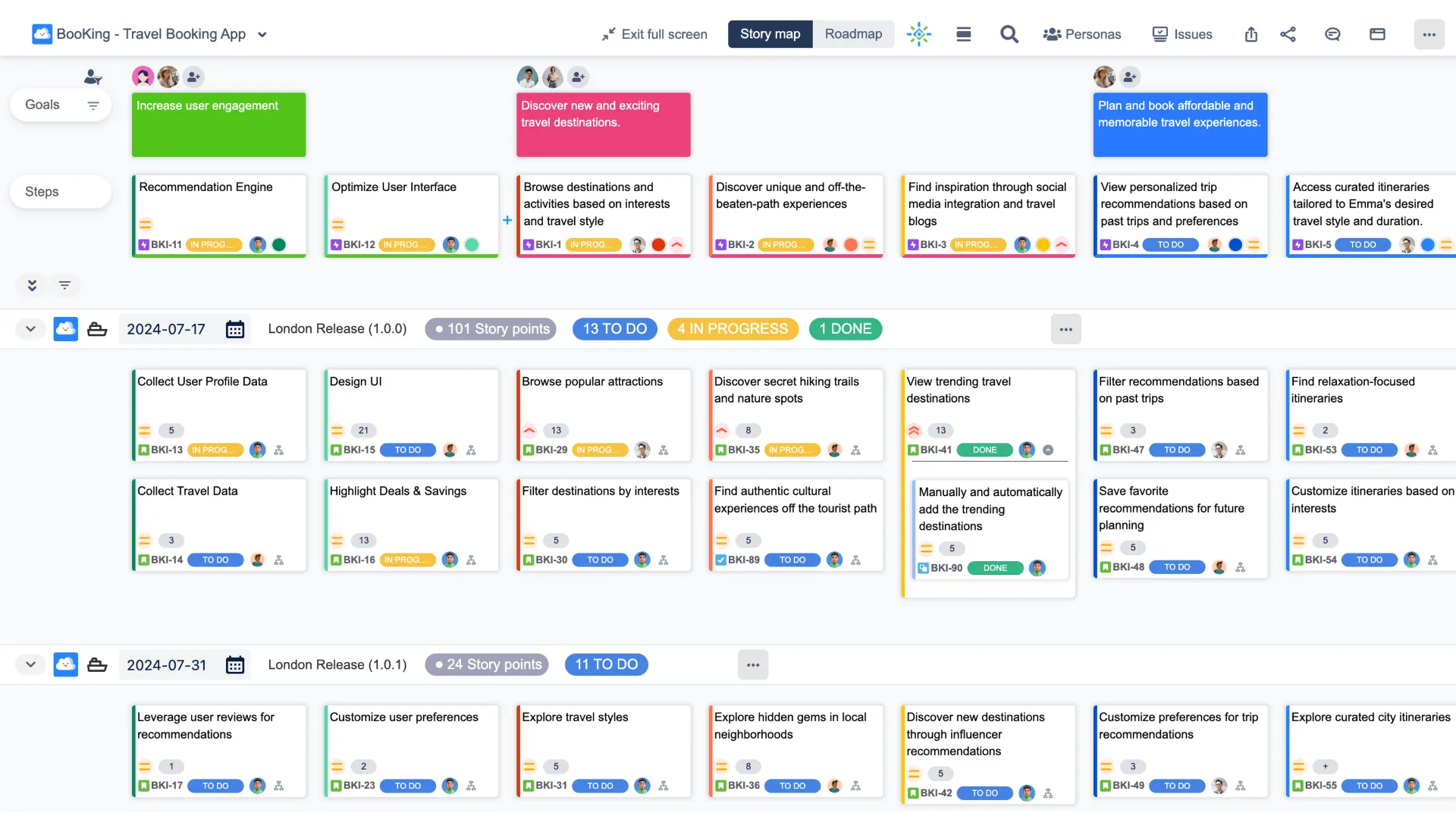
A story map app reads your real Jira issues and lays them out as a map. Epics or goals run across the top, stories sit underneath, and release or sprint lines run across the whole thing. Move a story on the map and the issue in Jira updates too. That’s the part a whiteboard can’t do on its own.
You’ll find a handful of these on the Atlassian Marketplace, including Easy Agile TeamRhythm, Planyway and our own ProductGo. We know ProductGo best, so that’s the one we’ll compare with plain Jira and whiteboards below.
|
|
Plain Jira |
Confluence whiteboard |
ProductGo |
|---|---|---|---|
|
Journey laid out left to right |
No, epics stack as rows |
Yes |
Yes |
|
Release or sprint lines you can drag stories across |
No |
You draw them by hand |
Yes, with views by release or sprint |
|
Map stays in sync with the backlog |
It is the backlog |
Synced issues update, but you keep the layout tidy by hand |
Yes, the map is built from your Jira issues |
|
AI that drafts your first map |
No |
Check your Confluence plan |
Yes. It suggests goals, steps and stories |
|
Personas, roadmap and portfolio views |
Timeline only (Plans on Premium) |
No |
Yes |
|
Cost |
Included in Jira |
Included in Confluence |
Free for up to 10 users on Jira Cloud |
The short version? Plain Jira and whiteboards are fine places to start. When you need the map to stay current release after release, a map that reads straight from Jira saves you the upkeep.
Which option fits your team?
A three-person team building a simple internal tool probably doesn’t need an app. The plain-Jira setup above is enough, and you can revisit the question when the backlog grows.
A team that runs a big story mapping workshop each quarter, then works from the backlog, will get a lot from Confluence whiteboards. Just set a reminder to update the board after each release, because it won’t update itself.
A team that plans every release or sprint from the map, across lots of epics or several projects, is where an app pays off. Keeping the map and the backlog in sync by hand is the kind of chore that quietly stops happening, and then nobody trusts the map anymore.
Build your first story map in Jira with ProductGo
If you’d like to try a real story map, here’s how to get a first draft in ProductGo without starting from a blank screen.
One heads-up first. A project admin or Jira admin needs to set up the AI generator, and a Jira admin can switch it on or off in ProductGo’s settings.
- Describe your product. In the AI generator, choose Create Generator Definition and enter the product type, a short description and the main features.
- Pick your goals. The AI suggests the big things users want to do. Keep the ones that fit, and regenerate the rest.
- Break goals into steps. For each goal, the AI proposes the steps a user takes. These become the left-to-right journey on your map.
- Add stories. From a step’s menu, generate stories, then choose which ones to add.
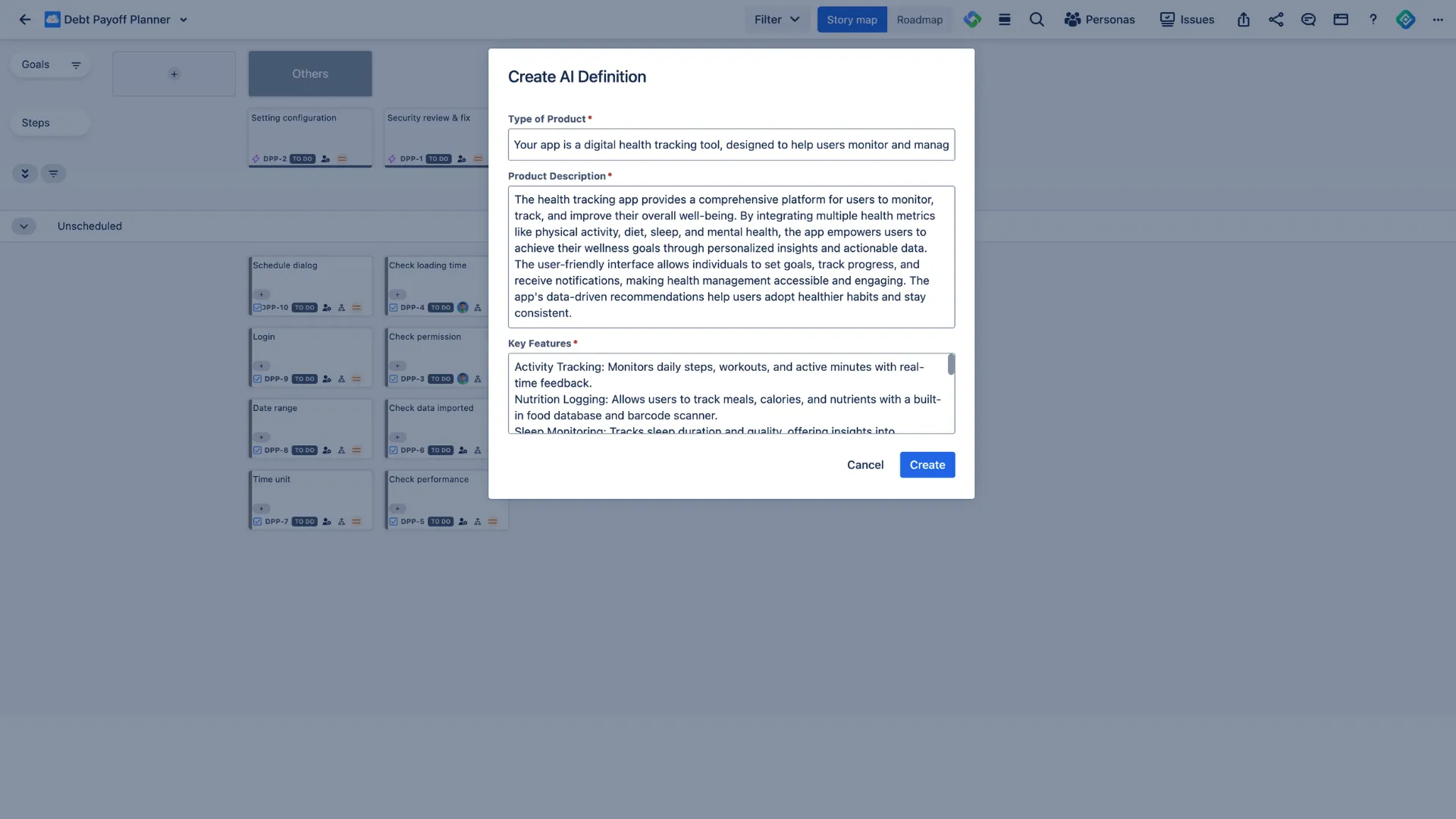
Drag stories into release or sprint lanes until the first release is the smallest thing that still works end to end. That’s the answer to “what’s in the first release?” from our opening, and now it’s on one screen.
Try ProductGo’s User Story Map free on the Atlassian Marketplace.
Final thoughts
So, does Jira have user story mapping? Not on its own, at least not yet. But that doesn’t mean you’re stuck with a flat backlog.
Start small. Try the 15-minute setup in plain Jira this week and run it through our three questions. Can you see the journey, the stories under each step, and a clear line for the first release? If the answer is yes, you might not need anything else for now.
If you keep hitting “not quite”, that’s your signal. For a map you plan from every sprint, one that’s built from your Jira issues will save you a lot of tidying up.
Whichever route you take, the goal is the same. When someone asks “what’s in the first release?”, you should be able to answer by pointing at one screen.
FAQ
Can you create a story map in Jira without an app?
Sort of. You can name epics after journey steps, group your board by epic and use fix versions as release lines. It works for small products, but you can’t see the whole journey and move stories between releases on one screen.
Does Jira Premium include story mapping?
Not as far as we can tell. Jira Premium adds Plans for planning across teams, which is great for timelines but isn’t a story map.
Can Confluence whiteboards replace a story mapping app?
For workshops, often yes. Whiteboards turn sticky notes into Jira issues and sync changes both ways. For ongoing release planning, an app is easier to keep in sync because the map is built from your Jira issues.
Is Jira Product Discovery a story mapping tool?
No. It’s built for collecting and prioritizing ideas. Atlassian suggests using it alongside story mapping, not instead of it.
Do story map apps work on Jira Data Center?
Some do today, including ProductGo. Atlassian has announced Data Center end of life for 28 March 2029, though, so we’d recommend setting up your story map on Jira Cloud.
Is there a free user story map app for Jira?
Yes. ProductGo is free for up to 10 users on Jira Cloud, and it includes the user story map.