User stories are a fundamental part of Agile software development. They provide a simple and clear method for capturing software features from the perspective of the user.
In this article, we’ll explore the user story template, how to write it, the different types of user stories, and examples to help you create effective user stories that drive development and meet user needs.
What is a User Story?
A user story is a brief, simple statement that describes a software feature or functionality from the perspective of the user. It defines the user’s need, the action they wish to perform, and the outcome they desire. The purpose of a user story is to capture the user’s perspective so that development teams can prioritize and deliver features that truly add value.
The key components of a user story are:
-
Persona: Who is the user or customer that will use the feature?
-
Need: What does the user want to do with the feature?
-
Purpose: Why does the user want to achieve this goal?
User stories are crucial in Agile development because they focus on delivering value to the end user. They also provide a clear communication tool that helps teams understand user needs and align the development process with customer expectations.
Example of a User Story
A typical user story template follows this format:
-
As a [user role], I want to [do something] so that [I can achieve something].
For instance:
-
As a shopper, I want to add items to my cart and checkout so that I can easily purchase the products I need.
In this example:
-
Persona: Shopper
-
Need: Add items to cart and checkout
-
Purpose: Easily purchase products
This format ensures the user story is simple and understandable, providing a clear goal for both the development team and the product owner.
User Story Format
The user story format is straightforward and helps keep communication simple. The most common format is the one described earlier:
-
As a [user role], I want to [do something] so that [I can achieve something].
This format works for a wide range of features and functionality, making it adaptable to various types of projects and needs. It ensures that the development process stays focused on user goals rather than technical details. Here’s an example:
-
As a user, I want to reset my password so that I can regain access to my account.
This statement outlines the user (persona), the action they need to take (reset the password), and the reason behind the action (to regain account access).
Why This Format Works
The strength of the user story format lies in its simplicity. It:
-
Keeps the focus on the user: The story starts with the user and their needs, which keeps the development process customer-centric.
-
Encourages clarity: By explicitly stating the user’s need and purpose, it ensures that everyone involved in the project understands what needs to be built and why.
-
Promotes collaboration: User stories are easy to discuss and refine with stakeholders, making it a great tool for collaboration.
Adhering to the INVEST criteria helps ensure the quality and effectiveness of user stories within Agile development. These criteria encourage a balance between flexibility and structure, ensuring that user stories are valuable, manageable, and aligned with user needs.
→ Related content: What is a User Story and why is it important?
Types of User Stories
There are several types of user stories depending on the complexity, scope, and scale of the task. Below, we’ll go over the four most common types of user stories (quickly use these templates here):
1. Simple User Stories
Simple user stories are straightforward, often representing a single task or feature that is easy to implement. These stories are typically small in scope and can be completed in a short period of time.
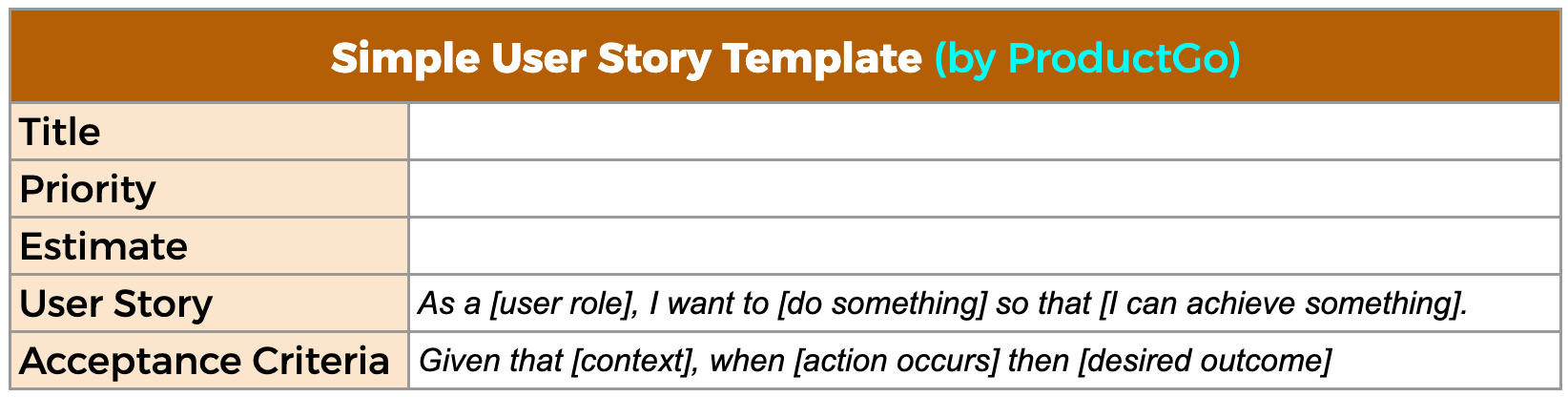
Examples of simple user stories:
-
As a user, I want to reset my password so that I can regain access to my account.
-
As a user, I want to search for products by name so that I can find what I’m looking for quickly.
These stories are generally small tasks that don’t require much detail or a lengthy development process. They help the team make quick progress while keeping the focus on delivering value to the user.
2. Epic User Stories
Epic user stories are large, high-level stories that often need to be broken down into smaller user stories. They represent significant pieces of work that may require multiple sprints to complete. Epics help organize work around big features or capabilities that span across multiple teams or development cycles.
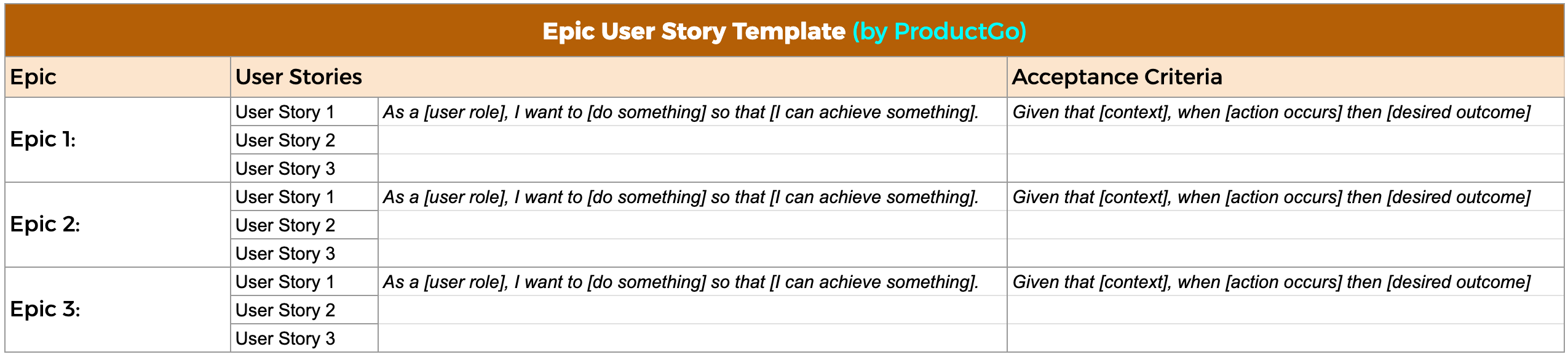
Examples of epic user stories:
-
As a user, I want to purchase products online so that I can shop from the comfort of my home.
-
As a user, I want to track my order status so that I know when my package will arrive.
Since epics are too large to complete in a single iteration, they should be broken down into smaller, more manageable user stories that can be delivered incrementally.
3. Thematic User Stories
Thematic user stories group related user stories together under a common theme or goal. They are useful for organizing work and ensuring that features are being developed in alignment with the overall product vision.
Unlike epics, thematic user stories allow for easier prioritization and tracking of progress within a theme or release.

Examples of thematic user stories:
-
As a user, I want to customize my profile so that I can have a personalized experience.
-
As a user, I want to view my order history so that I can track my purchases.
These stories are grouped based on their relation to a particular product feature or goal, which helps ensure that the development team is working towards a cohesive product vision.
4. SAFe (Scaled Agile Framework) User Stories
SAFe user stories are a more structured type of user story used in large-scale Agile projects. The SAFe (Scaled Agile Framework) methodology introduces layers of complexity to user stories to better suit large organizations with multiple teams working on a project.
SAFe user stories often deal with more complex systems and require cross-team collaboration. They can still be broken down into smaller stories, but they are generally used in large enterprise projects.
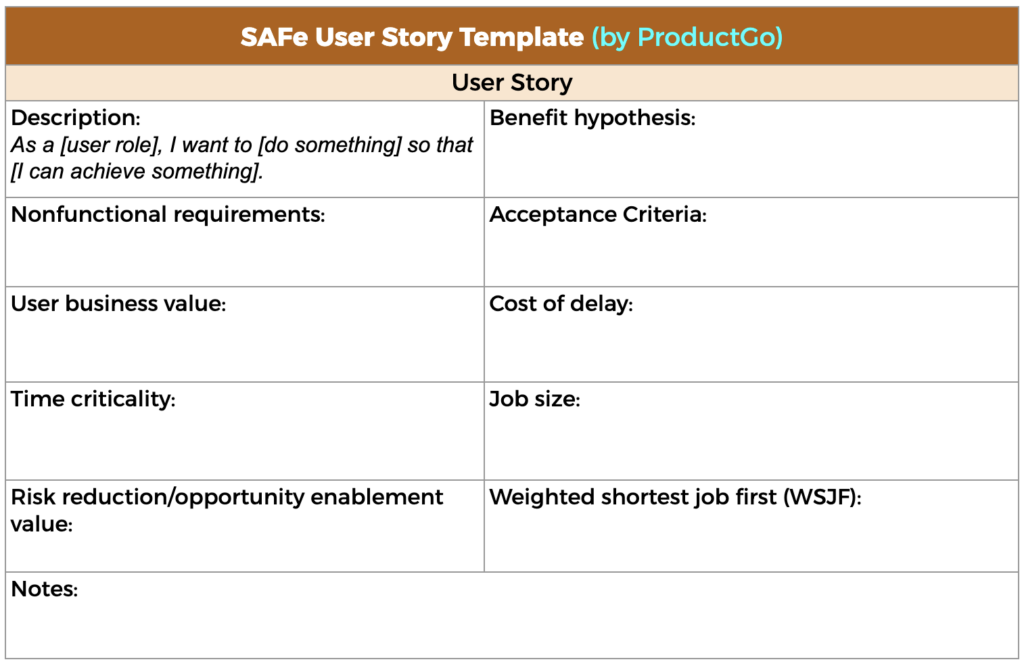
Examples of SAFe user stories:
-
As a user, I want to customize my profile so that I can have a personalized experience across multiple platforms.
-
As a user, I want to track my order status so that I can receive timely updates from different teams.
These stories are designed to be flexible and scalable to accommodate large teams working on interconnected features.
→ Click here to access to User Story Template by ProductGo
User Story with Acceptance Criteria
Acceptance criteria are a crucial part of user stories because they define the conditions that must be met for the story to be considered complete. These criteria help ensure that the feature fulfills the user’s need and aligns with the expected outcome.
Without acceptance criteria, user stories can be vague, leading to misunderstandings and misaligned expectations. Acceptance criteria also provide a way to validate whether the story has been successfully implemented.
Here are examples of acceptance criteria for user stories:
- User story: As a customer, I want to be able to add items to my cart and checkout so that I can easily purchase the products I need.
- Acceptance criteria:
-
-
The user must be able to browse the product catalog and add items to their cart.
-
The user must be able to enter their shipping and billing information.
-
The user must be able to review their order and proceed to checkout.
-
The user must receive a confirmation email after completing the checkout.
-
The acceptance criteria ensure that all the necessary steps for completing the task are clear and measurable. This allows the team to track progress and verify that the feature works as expected.
To effectively manage and visualize the timeline of these user stories and tasks, teams can use tools like a Gantt chart to map out dependencies and ensure that all tasks are completed within their planned sprints.
Sum Up
In Agile software development, user stories are an essential tool for capturing user needs and ensuring that the development process remains focused on delivering value. By using a simple user story template, teams can clearly articulate user needs and priorities, ensuring alignment across all stakeholders.
Whether you’re breaking down large epic user stories, organizing related stories thematically, or working within a large-scale SAFe environment, the user story format provides a clear and concise way to capture user needs and prioritize features.
User stories also allow teams to work incrementally, ensuring continuous feedback and improvement. By combining a solid user story template with clear acceptance criteria, Agile teams can deliver valuable features that meet user expectations and contribute to the overall product vision.